
Three years ago I let Bing loose on some AutoLISP and published the results — a fun novelty at the time, like watching a dog walk on its hind legs. Well, the dog has since gone to university. AutoCAD 2027 shipped on 25 March 2026 with an AI assistant built right into the product, and tucked into the launch announcement is a phrase that should make every LISP tragic sit up straight: it leans on Anthropic’s Model Context Protocol (MCP). And when you look at how the community has wired AI into AutoCAD, the punchline writes itself — the bridge is AutoLISP. The language we’ve been sharing on this blog for twenty-odd years turns out to be exactly how a chatbot gets its hands on your drawing editor.
MCP in drafter’s terms
Strip away the buzzwords and MCP is a standard plug socket for AI. Before it, every AI integration was a bespoke one-off — the software equivalent of a plotter that only takes one brand of pen. MCP standardises the connection: on one side sits an AI like Claude, on the other side sits a “server” that exposes tools the AI can use — read this file, run this command, query this database. Any AI that speaks MCP can use any MCP server. Think of it as the IGES/DXF moment for AI integrations: suddenly everything can talk to everything.
What the official Autodesk Assistant actually does (and doesn’t)
The Autodesk Assistant in AutoCAD 2027 is a Tech Preview, and Autodesk’s own launch post says it is “beginning to leverage Model Context Protocol” to understand what you’re actually working on. In practice that means context-aware answers instead of generic help-file regurgitation, and the genuinely useful trick of validating a drawing against your office CAD standards by just asking it in plain English. Architosh’s review covers it well.
But here’s the thing: it advises, it doesn’t draw. Ask it to whack in a grid of columns and it will politely explain how you might do that yourself. Fair enough for a Tech Preview — nobody wants an over-confident intern with command-line access to a live tender drawing. But the community was never going to wait.
The community got there first — and it runs on LISP
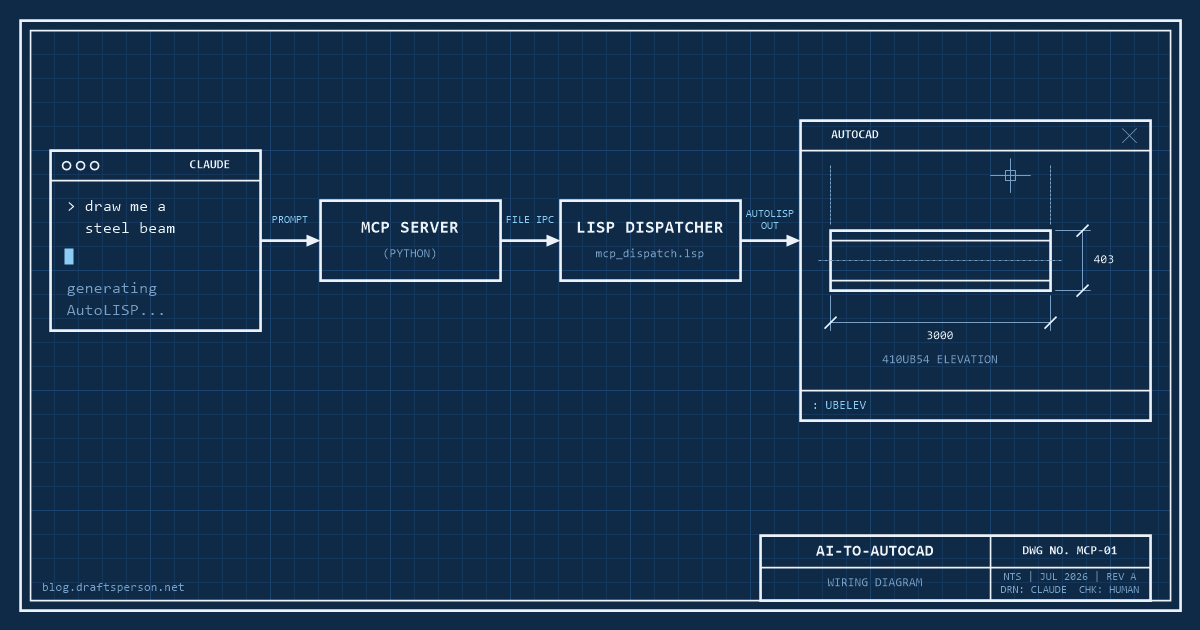
The open-source autocad-mcp project connects Claude directly to AutoCAD, and the architecture is a thing of beauty for anyone who’s spent decades in this language:
- You type a request to Claude — “draw me a steel beam elevation”
- A small Python MCP server receives the request and generates AutoLISP code
- The code is passed to AutoCAD through a file-based handoff, picked up by a LISP dispatcher (
mcp_dispatch.lsp) loaded in your session - AutoCAD executes it, and your beam appears
Read that again: the way a 2026 AI draws in AutoCAD is by writing AutoLISP and having AutoCAD run it. Every one of the 150-plus free routines on this site is written in the exact language the AI era chose as its bridge into the drawing editor. Our forty-year-old parenthesis farm isn’t the casualty of AI — it’s the infrastructure.
Yes, even AutoCAD LT
The quiet enabler here is that AutoCAD LT 2024 gained AutoLISP — the biggest thing to happen to LT in its history, and it barely made a ripple at the time. LT runs LSP, FAS and VLX files on Windows (no VLIDE, and LT for Mac misses out entirely — no LISP, no bridge, no AI drafting). That means the budget seat most small drafting offices actually pay for can be AI-driven with the same setup as full AutoCAD. Who saw that coming when LT was the “no customisation allowed” version?
Wiring it up
The short version of the setup, prerequisites first: Windows (the file-handoff mechanism is Windows-only), AutoCAD or AutoCAD LT 2024+, Python, and the Claude desktop app. Then:
- Clone or download autocad-mcp from GitHub and follow its install steps
- Add the server to Claude’s MCP configuration (one JSON block, documented in the repo)
- Start AutoCAD and load
mcp_dispatch.lsp— same APPLOAD routine you’d use for any LISP on this site - Ask Claude for something simple and watch your command line light up
Three gotchas worth knowing before you let it near anything real. One: set an undo mark first (or better, test in a scratch DWG — treat AI like work experience kids and keep them away from the tender set). Two: the dispatcher polls for command files, so there’s a beat of latency between asking and drawing — this is not real-time co-piloting. Three: the server’s built-in tools cover primitives — lines, plines, circles, arcs, text, hatches — with no structural steel library. Anything fancier goes through what the project calls freehand AutoLISP execution: Claude writes a routine from scratch, on the spot.
The test: “Claude, draw me a steel beam”
Which brings us to the fun part. Asked for a 410UB54 elevation, here’s the kind of routine Claude produces:
(defun c:UBELEV (/ p1 len d tf)
  (setq p1  (getpoint "\nInsertion point: ")
        len 3000.0   ; beam length
        d   403.0    ; overall depth, 410UB54
        tf  10.9)    ; flange thickness
  (command "._RECTANG" p1
           (list (+ (car p1) len) (+ (cadr p1) d)))
  (command "._LINE"
           (list (car p1) (+ (cadr p1) tf))
           (list (+ (car p1) len) (+ (cadr p1) tf)) "")
  (command "._LINE"
           (list (car p1) (+ (cadr p1) (- d tf)))
           (list (+ (car p1) len) (+ (cadr p1) (- d tf))) "")
  (princ))
Does it work? Yes — you get a 3-metre elevation with flange lines, correct section depth and all. The 410UB54 dimensions are right, which honestly would have been science fiction in the Bing days. But now let’s check it the way we’d check a junior’s shop drawing, red pen out:
- No error handler. Hit Esc halfway through and it leaves your settings wherever they fell. Every routine in the library that’s survived twenty years of use has a
*error*handler for a reason. - No undo grouping. A polite routine wraps itself in
_.UNDOBegin/End so one U reverses the lot. - Running osnaps will eat it alive. Those
commandcalls pass raw points — with ENDpoint or NEArest running, your flange lines can snap somewhere creative. The old-school fix (osnap suppression or entmake) is nowhere in sight. - Everything on the current layer. No layer discipline at all — it’ll happily draw your steel on the hatching layer.
- Hardcoded sizes. Want a 460UB67 next? That’s another trip to the chatbot instead of a lookup table.
In other words: it drafts like a keen graduate. Genuinely fast, dimensions correct, and blissfully unaware of the fifteen ways a production drawing environment will ambush it. You wouldn’t issue its work unchecked — but you’d absolutely hand it the tedious jobs, and it never asks for a pay rise.
The honest verdict
Where it shines today: batch edits, throwaway one-off routines, “just draw me a quick widget” moments, and roughing out geometry you’ll tidy yourself. Where it falls flat: standards, layers, judgement — everything that makes a drawing issue-ready rather than merely drawn. The AI is a competent junior drafter, and juniors need checking. Nothing it produces should touch a live project DWG without the same review you’d give any code you downloaded off the internet — including, dare I say, this site’s.
Where this goes next
Autodesk is expanding what the Assistant can do with MCP each release, and the community servers are maturing fast. My prediction: within a couple of versions, “prompt-driven drafting” will be a standard AutoCAD skill listed on job ads, and the drafters who understand what the AI is actually doing under the bonnet — that is, the ones who know their way around AutoLISP — will be the ones checking, correcting and supervising it. If you want to be ready, there are worse ways to start than reading a few hundred working routines and learning to spot what the graduate got wrong.
References
- Autodesk — “AutoCAD 2027 Is Here” (official launch post, March 2026) — release date, Autodesk Assistant and its use of Model Context Protocol, CAD-standards validation
- Autodesk — AutoCAD 2027 What’s New (official documentation) — full feature list for the 2027 release
- Architosh — “Autodesk 2027 Adds Strong New Features” (2 April 2026) — independent review confirming the Assistant is built on Anthropic’s MCP standard
- Model Context Protocol — official specification and documentation — what MCP is and how servers expose tools to AI clients
- autocad-mcp — open-source MCP server for AutoCAD (GitHub) — architecture, AutoLISP dispatcher, supported tools, AutoCAD LT 2024+ requirement, Windows-only file handoff
- Autodesk — “AutoLISP in AutoCAD LT 2024” (official blog) — LSP/FAS/VLX support in LT, no VLIDE, Windows only
- AUGI — “AutoCAD LT Gets the Power of AutoLISP” — corroborating detail on LT’s AutoLISP capabilities and limits