
Last updated July 29, 2026
Applies to:
- AutoCAD 2016, Similar principles to earlier versions.
Tutorial:
About the Author

Update for current AutoCAD releases
The tutorial above was written in 2015 for AutoCAD 2016. The method still holds — the notes below cover what has shifted since, and the reverse problem it does not touch on.
The folder path moves with the release
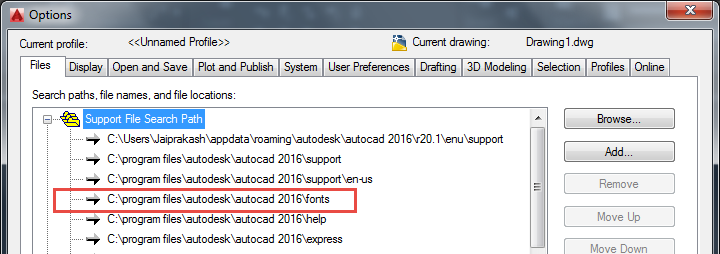
The Fonts folder follows the version number, so on a current install it is C:\Program Files\Autodesk\AutoCAD 20xx\Fonts with the year of your release. That is worth knowing at upgrade time, because a font dropped into the old release’s folder does not travel.
The more durable approach is the one the tutorial points at without quite spelling out: it is not the Fonts folder specifically that matters, it is the Support File Search Path. Any folder on that list is searched. Put your fonts in a folder of your own, add it to the path in OPTIONS → Files, and they survive the next upgrade. Autodesk also accepts a font sitting in the same folder as the drawing that uses it, which is the quick fix when a font belongs to one job.
The other half of the problem: a font you do not have
Most people go looking for how to install a font because a drawing arrived asking for one. AutoCAD carries on and substitutes something, reporting it on the command line — Autodesk’s own example is “substituting simplex.shx for archquik.shx”. Read that line: it names the font you actually need.
You can also decide in advance what gets substituted. FONTALT sets the fallback and defaults to simplex.shx; a font mapping file, set by FONTMAP, lets you map particular missing fonts to particular replacements instead of sending everything to one fallback.
And the fix that stops it recurring, straight from Autodesk: “If the file has been received from a third party, ask to have it saved using ETRANSMIT. The font will be packed together with the drawing file.” Do the same when you issue drawings and nobody has to chase you either.
One cause that sends people hunting for a text font that was never the problem: a linetype containing embedded symbols references an SHX shape file too. A missing-SHX warning on a drawing whose text looks fine is usually a linetype.
There is more on all of this, plus 90-odd free SHX fonts to download, on our AutoCAD text styles guide — including how to set up the text style once the font is installed.
References
- “One or more SHX files are missing. What do you want to do?” — Autodesk Support, 17 November 2025. Font locations, the Support File Search Path check, the substitution behaviour, the ETRANSMIT advice, and linetypes as a cause.
- About Substitute Fonts — Autodesk AutoCAD 2026 Help. FONTALT, the simplex.shx default and the font mapping file.
- Files Tab (Options Dialog Box) — Autodesk AutoCAD 2026 Help. The Support File Search Path.