
Last updated July 27, 2026
TXP is a free routine for AutoCAD that explodes single-line TEXT entities into polylines. Its author, Ken, describes it as eliminating font garbage and overlapping or duplicate lines, and outputting clean open and closed polylines rather than a loose pile of segments: it eliminates font garbage and overlapping or duplicate lines, and outputs clean open and closed polylines instead of a loose pile of segments.
Turning text into real geometry is a common step when preparing drawings for engraving, routing, laser cutting or signage work, where the downstream software wants profiles rather than text entities. It also removes any dependency on the original font, which helps when a drawing has to open cleanly on someone else’s system.
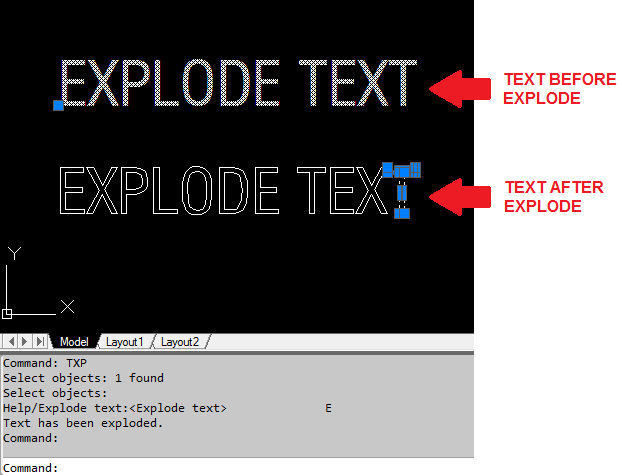
What it does in practice
According to the original description, TXP converts TEXT entities into polyline outlines and cleans up as it goes. The result is open and closed polylines that you can offset, hatch, trim or export like any other geometry. Two limits are worth knowing before you download it.
- It works on single-line TEXT only, not MTEXT. If your notes are MTEXT, running AutoCAD’s standard EXPLODE command on them first reduces them to single-line TEXT entities, which is the entity type TXP handles.
- It ships as a compiled VLX file, so there is no source code to read or modify.
What is inside the download
The Txp.zip archive contains txp.VLX, a compiled Visual LISP executable. A VLX is a compiled set of one or more LSP and/or dialog control language (DCL) files, and this one is marked as protected — its header shows a single compiled FAS module with the protection flag set, which means the original AutoLISP source cannot be recovered or inspected. The header also flags ActiveX support, a Windows AutoCAD technology.
Because the file is protected, we cannot publish a command reference or quote its prompts the way we do for routines with open source. The convention with single-purpose tools like this is that the command matches the routine name, the compiled file does not reveal its command name, so check the command line echo after loading it, but the compiled file does not let us confirm that. Treat it as a black box: load it, run it on a copy of your drawing, and check the result.
How to load it
A VLX loads exactly the same way as an ordinary LSP file. Unzip the archive somewhere sensible, run the APPLOAD command, browse to txp.VLX and click Load. If you want it available in every session, add it to the Startup Suite in the same dialog. New to loading routines? Our AutoLISP guide covers loading and managing routines in more detail, and the free LISP routine library has plenty more to load alongside it.
Compatibility notes
The author lists it as worked on AutoCAD 2012. Compiled VLX files run on full AutoCAD, not AutoCAD LT — this VLX declares ActiveX support in its header, a technology AutoCAD LT’s AutoLISP does not provide, so LT users should look elsewhere, so LT users should look elsewhere. See our rundown of what runs on AutoCAD LT for the detail. The ActiveX flag in the file header points to Windows versions of AutoCAD. As always with an older compiled routine, test it on a copy of a drawing before relying on it in current releases.
Download
| Name: | TXP |
| Description: | Explodes text to polylines. Eliminates font garbage, overlapping/duplicate lines and outputs clean open and closed polylines. for TEXT only not for MTEXT |
| Type: | AutoCAD AutoLISP Routine |
| Author: | Ken |
| File Size: | 10 Kb |
| Cost: | Free |
| Worked on: | AutoCAD 2012 |
| Download File: | Txp.zip NB: the VLX file contained is a compiled set of one or more LSP and/or dialog control language (DCL) files |
Related routines
- ArcText LISP routine — another text-focused routine from the library
- Add or Subtract Text LISP routine — works with the values held in text entities
- Numbering LISP routine collection — text numbering tools