
Last updated July 28, 2026
This download is a piece of AutoCAD history, and knowing what it actually is changes how you should approach it. The archive is Autodesk’s own Bonus Tools from the Release 14 era — the collection that became Express Tools in later releases and, in many cases, ended up built into AutoCAD itself. The included text file is Autodesk’s: “Thank you for Installing the Bonus Tools!!! … they are intended to augment your existing AutoCAD installation, and reflect many wish-list items which did not make it into the core package.”
If you have used BURST, TXTEXP, EXTRIM, MSTRETCH, REVCLOUD, TEXTMASK, TEXTFIT, GATTE, CLIPIT or WIPEOUT on a modern AutoCAD, you have used descendants of the files in this zip. That is what makes it interesting. It is also the reason most people do not need it, which is worth saying plainly before you download 440 KB.
Half of it will not load on a modern AutoCAD
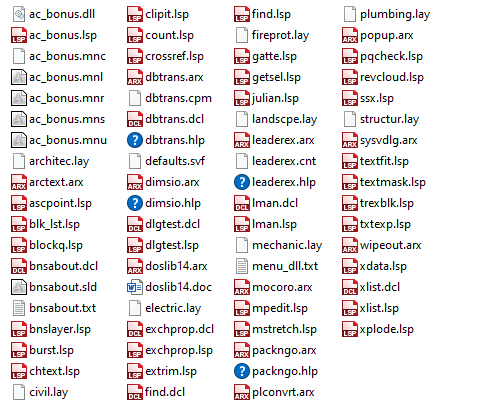
The archive holds 30 AutoLISP files and 11 compiled ARX modules, plus dialog definitions, menu files and layer templates. That split matters.
ARX modules are compiled against a specific AutoCAD release. An ARX built for Release 14 cannot load on any later version — the interface it was compiled against no longer exists, and there is no compatibility mode. So the eleven ARX files here, which include the original ARCTEXT, WIPEOUT, MOCORO, PACKNGO, LEADEREX, DIMSIO, SYSVDLG, PLCONVRT, POPUP, DBTRANS and DOSLib for R14, are inert on anything current. They are not broken; they are simply for a program that no longer exists.
The AutoLISP files are a different story. Plain LISP does not care much about release, so files like BURST.LSP, CHTEXT.LSP, SSX.LSP, EXTRIM.LSP, MPEDIT.LSP, TEXTFIT.LSP, TXTEXP.LSP, XLIST.LSP and REVCLOUD.LSP may well still load and run. The catch is that several of them call into the ARX modules or the bonus support library, and those calls will fail. Expect to try them one at a time rather than loading the lot.
The menu files (ac_bonus.mnu and its compiled companions) are in the old MNU format, superseded long ago by CUI. The toolbars the listing mentions belong to that menu system and will not appear on a current release.
Why download it at all
Three honest reasons.
- You are running an old AutoCAD. If R14 or thereabouts is still in service somewhere — and it is, on machines driving old plotters and old post-processors — this is the package it was made for and everything in it works.
- You want the source. These are readable, commented AutoLISP files written by Autodesk to solve real drafting problems. As worked examples they are considerably better than most of what circulates.
- You are on AutoCAD LT. Express Tools have never been part of LT, so the modern commands these grew into are not available to you. Some of the plain-LISP ones may run on LT 2024 or later, which is the first release to include AutoLISP at all. That is worth an experiment.
If you are on a current full AutoCAD, check whether the command you want is already there before you install any of this. Most of them are.
What is inside
Broadly, the collection breaks into groups. Text tools: chtext, textfit, textmask, txtexp, find, gatte for editing block attributes globally. Layer tools: lman for saving and restoring layer states, bnslayer, and a set of .lay layer templates for architectural, civil, electrical, mechanical, structural, plumbing, fire protection and landscape work. Drawing and editing tools: burst for exploding blocks while keeping attributes as text, extrim, mstretch, mpedit, clipit, revcloud, xplode, ssx for selection by property. Utilities: xlist, xdata, blockq, count, ascpoint, julian, packngo. Plus the ARX modules noted above and the layer, dialog and menu support files.
The listing credits the authors as “Various, see files for credits”, which is accurate — individual files carry their own headers, and reading them is part of what makes this worth keeping.
How to load it
Do not load the whole package blind. Unzip it somewhere outside your support path, look at the file listing, and pick the one routine you actually want. Read its header, then load just that file with APPLOAD and test it in a scratch drawing. If it calls something it cannot find, you will see the error immediately and can move on.
Take particular care with the menu files. Putting an old MNU or MNS where AutoCAD can find it can interfere with your current menu setup, and untangling that is a bad afternoon. Our AutoLISP guide covers loading individual files safely.
Compatibility notes
Release 14 era throughout. The ARX modules are release-locked and will not load on anything newer, as covered above. The AutoLISP files are worth trying individually. The menu system is obsolete. Nothing here should be treated as tested on a current release. See what runs on AutoCAD LT for the LT position, and note that anything calling an ARX module is full-AutoCAD territory by definition — LT does not load ARX at all.
Download
| Name: | CAD tools |
| Description: | A collection of bonus AutoCAD tools with 3 individual toolbars; Bonus Standard Toolbar, Bonus Text Tools, and Bonus Layer Tools. |
| Type: | AutoCAD AutoLISP Routine |
| Author: | Various, see files for credits |
| File Size: | 440 Kb |
| Cost: | Free |
| Worked on: | AutoCAD |
| Download File: | CAD Tools.zip |
Related routines
- LLP Suite — a much larger third-party collection with its own toolbars.
- Best of LISP collection — a smaller, readable grab bag.
- ATEXT — a plain-LISP text-on-arc routine that will run where the ARX version here will not.