
Last updated July 28, 2026
The LLP Suite is the largest collection in this library by a wide margin: 83 AutoLISP files defining 81 separate commands, with 96 toolbar icons and a full toolbar definition to drive them. Where most downloads here give you one routine, this one gives you a working environment.
The strength of it is coverage. Layer control, text editing, attribute manipulation, dimension tools, block handling and xref management are all represented, and the tools within each group are the ones that come up daily rather than the exotic ones. The weakness is the same thing seen from the other side: 81 commands is more than anyone will learn at once, and there is no single entry point.
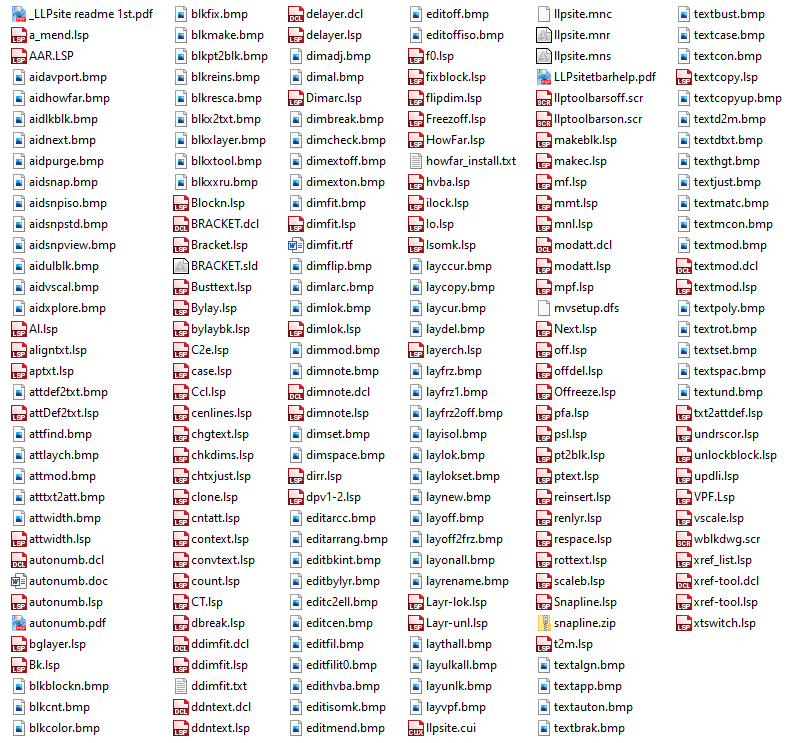
What is in it, by job
The commands defined across the 83 files group roughly like this.
- Layers — BGLAYER, DELAYER, LAYERCH, RENLYR, FREEZOFF, OFFREEZE, OFF, OFFDEL, ILOCK, LAYR-LOK, LAYR-UNL, VPF, PSL, plus the layer toolbar icons for isolating, freezing, locking and restoring.
- Text — APTXT, BUSTTEXT, CASE, CHTXJUST, CONVTEXT, CTXT, PTEXT, ROTTEXT, UNDRSCOR, T2M, TC, CENLINES and more. Case conversion, justification changes, exploding text, converting between text and mtext.
- Attributes — ATTDEF2TXT, TXT2ATTDEF, ATTWIDTH, MODATT, CNTATT. Converting between attribute definitions and text, and editing attributes in bulk.
- Dimensions — CHKDIMS, DDIMFIT, DFIT, DIMA, DIMLOK, DNOTE, FLIPDIM. Checking dimensions for overrides, fitting text, locking, flipping.
- Blocks — BLOCKN, MAKEBLK, REINSERT, PT2BLK, SCALEB, FIXBLOCK, LOCKBLOCK, UNLOCKBLOCK, COUNT, CLONE.
- Xrefs and viewports — XREF_LIST, XRTOOL, XTLON, XTLOFF, VSCALE, VPF.
- General drafting — AL, BRACKET, C2E, DBREAK, HOWFAR, HVBA, ISOMK, MF, MMT, MPF, NEXT, SNAPLINE, AAR, CCL, MAKEC, IO, F0, DIRR, RS, CONTEXT, UPDLI.
Several arrive with their own dialog definitions — autonumb, ddimfit, ddntext, delayer, modatt, textmod, bracket and xref-tool all ship a .dcl file — and a few carry their own documentation as PDF, RTF or plain text alongside the code.
Names will collide
With 81 commands going in at once, this is the practical thing to plan for. Several names here duplicate routines you may already have: FIXBLOCK is also a standalone download on this site, OFF appears in the Best of LISP collection, and COUNT is in the R14 Bonus Tools package. Whichever loads last wins, silently.
Short names are the bigger risk. AL, MF, IO, RS, TC, F0, CT, BK, AT and NT are two characters or fewer, and short command names are exactly what people assign to their own favourite routines and aliases. Load the whole suite into an existing customised setup and something you rely on may quietly stop being what you thought it was.
The safe approach is to load it into a clean profile first and see what you have, rather than dropping it into a working setup on a deadline.
How to load it
Start with the PDF readme in the archive — the author named it so it sorts to the top of the folder, which tells you they meant it to be read first. There is a second PDF documenting the toolbars.
Individual routines load like any other: point APPLOAD at the .lsp file you want. Anything with a matching .dcl file needs that dialog file findable on the support path too, or the command will load and then fail when it tries to open its dialog.
The toolbars are a bigger commitment. The suite ships a .cui file along with the older .mns, .mnc and .mnr menu files, and two script files that switch the toolbars on and off. Read the toolbar PDF before running those, and take a copy of your current menu configuration first. Our AutoLISP guide covers loading individual routines safely.
Compatibility notes
The presence of a .cui file alongside the older menu formats puts the suite somewhere around the AutoCAD 2006 to 2010 period, when CUI replaced MNU. Written-for rather than tested-on, and with this many files the honest answer is that some will work on a current release and some will not — test the ones you want individually.
For AutoCAD LT: the plain-LISP routines are candidates on LT 2024 or later, the first release with AutoLISP, but any command that opens a dialog is out, because LT does not support DCL. Roughly a dozen routines here ship a .dcl file and those are full-AutoCAD only. See what runs on AutoCAD LT. Many of these routines modify drawing content in bulk, so work on a copy while you find out which ones you like.
Download
| Name: | LLP Suite |
| Description: | A group of tons of lisp routines complete with toolbars. This lisp collect has various lisp routines for layers, text, attributes, etc…just load it up and give it a try! |
| Type: | AutoCAD AutoLISP Routine |
| Author: | See files |
| File Size: | 384 Kb |
| Cost: | Free |
| Worked on: | AutoCAD |
| Download File: | LLP Suite.zip |
Related routines
- CAD Tools — Autodesk’s own R14 Bonus Tools, the ancestor of Express Tools.
- Best of LISP collection — a much smaller set, documented file by file.
- Fixblock — the standalone version of one of the routines bundled here.